 Help Center
Here are the most common questions and solutions from users. Click on a question to view detailed answers.
1. Electronic signature refers to the data contained in electronic form and attached to it to identify the signer and indicate that the signer approves the contents.
2. China's Electronic Signature Law came into effect on April 1,2005, electronic signatures on electronic documents have the same legal effect as handwritten signatures or seals on paper documents. FDA 21 Part 11 on electronic signatures and electronic records of United States Food and Drug Administration is recognized and accepted by the global medical, medical, life and health community.
3. Modern electronic signatures use more secure digital certificate encryption techniques. Digital certificates guarantee the original integrity 、 non-tampering and non-repudiation of signatures of document content. Compared with traditional paper signature, electronic signature can reduce enterprise cost, improve enterprise efficiency and save data quality.
Electronic signature system is the software to complete the electronic signature workflow. It replaces the traditional signature and paper workflow with secure digital signature. Users can review or sign documents through PC web or mobile phone. The software provides rich workflow management, authority control, audit information, archive management, and flexible configuration of system options.
Accounts are automatically locked when login failures exceed the configured threshold.
When the registration link shows as expired, you need to contact the administrator for a new invitation.
External users cannot log in and can only view signed workflows through email links. When the link expires, they cannot access the workflow.
You may have multiple tenants. Click on your profile avatar to switch between tenants and search.
Documents cannot be replaced after a workflow is initiated. You need to cancel the workflow and start a new one.
Click on your profile avatar -> Personal Settings -> Personal Certificate -> Request Update
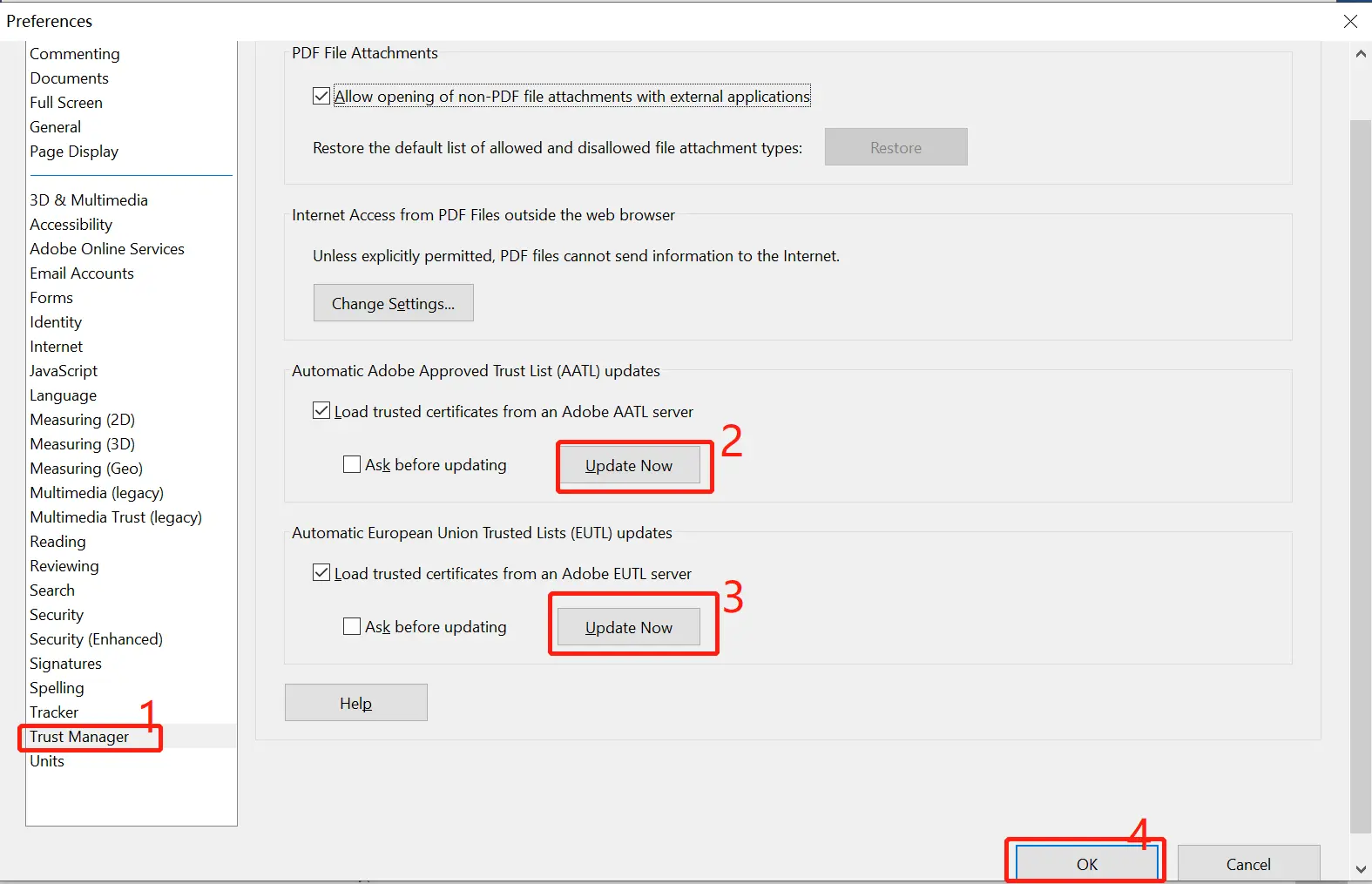
If Adobe Reader DC on your computer hasn't added the enterprise certificate as trusted, causing signature display issues, follow these steps:
Open Adobe Reader DC, select "Edit" > "Preferences (Windows)" or "Acrobat"/"Acrobat Reader" > "Preferences"
From the "Categories" on the left, select "Trust Manager"
Check "Automatically Adobe Approved Trust List (AATL)" updates - "Update Now"
Check "Automatically European Union Trust Lists (EUTL)" updates - "Update Now"
When you first open a signed document, the list will be downloaded. The system will ask you to confirm whether to receive automatic AATL updates. If you want to receive updates, click "Yes".
Non-PDF documents are automatically converted to PDF format after upload, which may cause formatting inconsistencies during the conversion process.
To resolve this issue, we recommend converting documents to PDF using Office software before uploading.